


How a ground transportation company cut runaway Azure spend by 46% with an automation-first FinOps engine.
Executive Summary
The client’s cloud footprint had quietly grown past anyone’s control. What was supposed to be a ~$30K/month Azure environment had drifted to over $65K/month, managed by a third-party IT vendor with no tagging discipline, no ownership boundaries, and more than eight accounts holding Global Admin. Nobody could say with confidence who had spun up what, or why.
Rather than throwing more headcount at the problem, the Movate Enterprise Solution Architect accepts the challenge as an automation-first opportunity. The result: a purpose-built, tag-driven automation engine that shuts down every non-critical workload outside business hours and continuously right-sizes resources what’s left running, with zero manual intervention required to operate it day to day. Monthly spend is now down to $35K, access has been reduced to a least-privilege model, and for the first time, the client’s engineering leadership can see exactly what’s running, why, and what it costs.
Problem Statement
The client’s cloud operations, spanning data analytics pipelines, a data warehouse, an internal security tool, and BI dashboards, had been fully outsourced to an external IT service provider. On paper, that meant someone else carried operational responsibility. In practice, it meant nobody on the client’s team had a clear, current picture of what was actually running.
The numbers made the problem impossible to ignore:
- Azure Spending: $65,000/month — more than double the expected run rate.
- Visibility: 85% of the VMs and DBs where overprovisioned with no reliable way to determine who was provisioning or operating resources, or why.
- Ad hoc resource provisioning — infrastructure was spun up reactively, with no standard process and little decommissioning.
- Wide-open access — more than eight accounts held Global Admin, far outside a least-privilege model.
- Compounding risk from the previous vendor’s management model — the combination of unmanaged provisioning and excessive access had created both security loopholes and performance bottlenecks alongside the cost overrun.
Why the previous approach didn’t hold up
None of this happened because anyone was careless on purpose. It’s the predictable failure mode of managing cloud infrastructure the way you’d manage on-prem servers: manually, reactively, and without a systematic ownership model.
A few specific gaps stood out once we started digging in:
- No tagging strategy existed, which meant there was no reliable way to distinguish development, staging, and production workloads programmatically. Every cost or access decision had to be made by memory or tribal knowledge instead of policy.
- Shutdown and scaling were manual: Without automation, “remember to turn off the dev VMs tonight” simply doesn’t survive contact with a busy team, night after night, indefinitely. It only takes a few missed nights a month for idle compute to become a structural cost, not an occasional one.
- Access was granted for convenience, not scoped for need. Eight-plus Global Admins is not a policy decision so much as an absence of one. It’s what happens when nobody owns identity governance as its own workstream.
- The waste was bigger than the team realized: across the DB nodes and VMs clusters we analyzed, the provisioned capacity was paid for but never used. Over 60% of provisioned VMs used 15% of average vCPU and 65% of peak vCPU for the last 45 days. 75% of the databases haven’t even used 15% of provisioned IOPS for the same measured timeframe.
- There was no feedback loop. Even where cost anomalies existed, there was no monitoring layer surfacing them, so problems compounded quietly for months before anyone noticed the billing trend.
In short: the previous model depended entirely on humans remembering to do the right thing, consistently, forever. That doesn’t scale, and it doesn’t survive vendor turnover, staff turnover, or a busy quarter. Our approach inverted that assumption from day one: if it depends on a person remembering, it will eventually fail, so it shouldn’t depend on a person.
The gap in Azure-native cost optimization tooling
Before building anything custom, we evaluated what Azure already offers natively. Because the right answer is never to reinvent something Microsoft already provides well. What we found is that native tooling covers pieces of this problem, but no single first-party feature covers the whole one:
- Azure Advisor surfaces right-sizing and idle-resource recommendations, but it’s a recommendation engine, not a remediation engine. Coverage and implementation of recommendations happen manually, one resource at a time. There’s no built-in way to say, “apply this automatically, every time, across every dev-tagged resource,” and depth of coverage varies by resource type, with newer or less common resource types receiving less complete recommendations.
- Azure Cost Management + Budgets is excellent for visibility and after-the-fact alerting on spend, but it’s fundamentally a reporting and alerting layer. It tells you that you overspent, it doesn’t stop you from doing it again tonight.
- The built-in per-VM Auto-shutdown setting does exist, but it’s a single-VM configuration with no native auto-start counterpart, no tag-based fleet targeting, and no concept of PaaS resources at all. Scaling it across a growing, tagged fleet of dev VMs means visiting each VM individually, which is exactly the kind of manual dependency that had already failed once.
- Microsoft’s own “Start/Stop VMs v2” solution is the closest native building block to what we needed, and a solid option in isolation. However, it’s VM-only. It has no awareness of Azure Database for PostgreSQL/MySQL Flexible Servers or SQL Managed Instances, and it deploys as its own separate stack (its own Function App, storage account, and monitoring surface) rather than as a lightweight layer that extends cleanly to the PaaS estate sitting alongside those VMs.
None of these tools were wrong to use. We simply couldn’t assemble the client’s actual requirement (one schedule, one tagging model, covering both compute and PaaS databases, fully automated end to end) out of them without stitching together multiple partial solutions and still leaving the database tier unmanaged. That gap is precisely why we engineered a single, purpose-built automation layer rather than defaulting to the nearest off-the-shelf option.
The turnaround: an automation-first FinOps engine
We broke the implementation into four layers, each one addressing a specific failure mode in what came before.
Phase 1: Governance and visibility
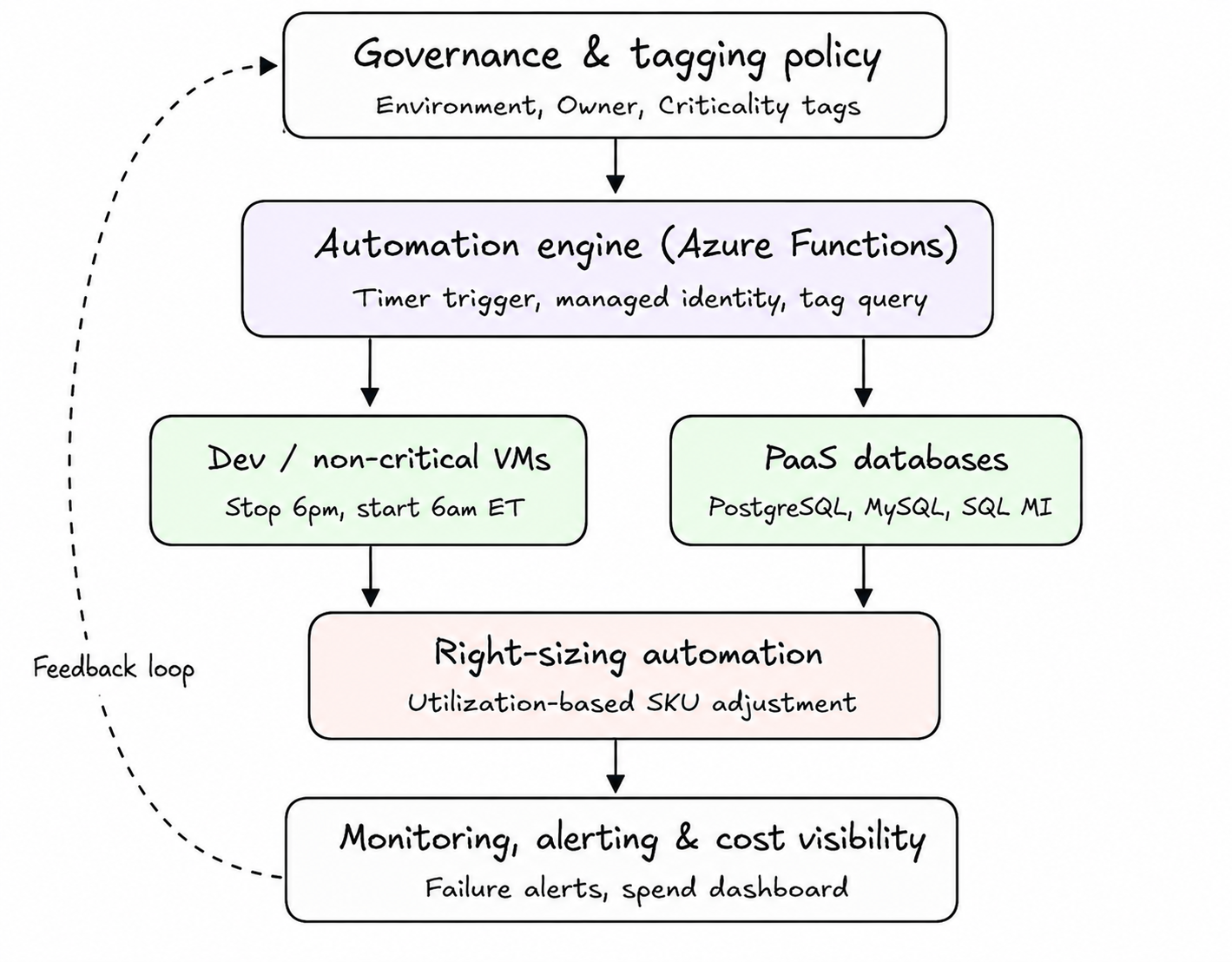
Before automating anything, we needed a reliable way to know what a resource was: dev or production, critical or not. Without relying on naming conventions or memory. We introduced a mandatory tagging taxonomy (Environment, Owner, CostCenter, Criticality) enforced through Azure Policy, so every resource declares its own purpose at creation time. This single change is what made everything downstream possible: automation can only safely act on a resource if it can determine what that resource is for, programmatically, every time.
Alongside tagging, we collapsed the Global Admin sprawl to a small, audited set of role assignments scoped to what each team actually needs, closing the access gap that had been sitting quietly alongside the cost problem.
Phase 2: Tag-based auto-shutdown (proprietary automation engine)
This is the centerpiece of the solution, and it’s the piece we consider genuinely our own engineering, purpose-built for the client’s environment rather than adapted from an off-the-shelf template.
At its core: a serverless Azure Functions engine, running on a timer trigger, authenticated entirely through a system-assigned Managed Identity, no stored credentials anywhere in the pipeline. Every scheduled run query Azure Resource Manager for every resource carrying an “Environment=ScheduleShutDown” tag, across both Virtual Machines and PaaS database services, Azure Database for PostgreSQL and MySQL Flexible Servers, and SQL Managed Instances. Stops them on schedule, then brings them back up automatically ahead of the next business day.
A few engineering details that made this reliable rather than merely functional:
- Time-zone-aware scheduling with automatic Daylight-Saving handling. The schedule is defined against a named time zone rather than a fixed UTC offset, so the shutdown/startup window stays correct through DST transitions without anyone touching a configuration file twice a year.
- Fully tag-driven targeting, with no hardcoded resource lists. Tag a new dev VM or database on creation, and it’s automatically in scope on the very next scheduled run. No code change, no ticket, no manual onboarding step.
- Least-privilege execution identity. The automation only holds the specific rights needed to start and stop resources, scoped to the resource groups it’s responsible for.
- Built-in failure alerting. If a scheduled run fails for any reason, the team is notified the same day rather than discovering it via a surprise invoice at month-end.
The effect is straightforward: every non-critical workload that doesn’t need to run overnight, simply doesn’t. Every single night, without anyone remembering to do it.
Phase 3: Continuous rightsizing
Shutting things off overnight solves half the problem; the other half is that many resources were oversized for the load they carry even during business hours. We layered in a right-sizing automation pass that continuously evaluates utilization telemetry (CPU, memory, IOPS) against each resource’s actual consumption pattern and generates SKU adjustments recommendations during defined low-risk maintenance windows, rather than leaving sizing decisions to whoever provisioned the resource in the first place.
Phase 4: Blended spot and on-demand purchasing
The fourth layer addresses the commercial side of the cost equation, not just the operational side. The client’s analytics and data-warehouse workloads don’t run at a flat, predictable volume. Load varies by day and by season, which makes multi-year Reserved Instance or Savings Plan commitments a poor fit: sized for peak, they overpay through every quieter period; sized for average, they fall short exactly when load spikes.
Instead of defaulting to that commitment-first model, we classified workloads by interruption tolerance and routed each accordingly:
- Interruption-tolerant workloads: batch analytics jobs, report jobs, non-critical dev/test compute run on Spot capacity, capturing steep discounts against on-demand pricing, with the automation engine handling checkpointing and graceful re-queuing when Azure reclaims spot capacity.
- Availability-sensitive workloads: anything that can’t tolerate an unplanned interruption, stay on on-demand pricing + Savings plan mix. With commitment for the average usages only. Such that stability isn’t traded away for savings where it matters.
- The automation engine makes the placement decision continuously, rather than fixing it at provisioning time, so the mix shifts automatically as workload patterns change.
This gives the client cost optimization that flexes with real demand, without locking the environment into a usage shape via a one- or three-year commitment that may not hold a few months from now.
Architecture
The diagram below shows how the pieces connect: governance and tagging feed the automation engine, the engine acts on both compute and PaaS data services, and every action is monitored and reported back into cost visibility. Closing the loop that was missing before.
Business benefits
| Metric | Before | After |
| Monthly Azure spend | $65,000 | $35,000 |
| Target budget | $30,000 | $30,000 (gap narrowed from +117% to +17%) |
| Global Admin accounts | 5+ | Reduced to least-privilege model |
| Resource visibility | None (vendor-managed, untagged) | Full tag-based inventory and ownership |
| Off-hours dev/non-critical compute | Running 24/7 | Automatically stopped ~12 hrs/night, 6 nights/week |
| Manual effort to operate the shutdown schedule | N/A (didn’t exist) | Zero — fully automated, self-healing schedule |
Monthly spend dropped 46% from its peak, and the remaining gap to the original $30K target is now a scope for application optimization and actively tracked delta rather than an open-ended mystery.
What’s next
The $35K current run rate isn’t the finish line. It’s the new, visible baseline. With tagging and monitoring now in place as permanent infrastructure rather than a one-time cleanup, the roadmap ahead focuses on extending automated right-sizing coverage to the PaaS database tier and evaluating reserved-capacity commitments for the workloads that have now proven to be genuinely steady-state.
About the author

Pallab, an AVP and Enterprise Solution Architect, drives AI/ML and cloud initiatives and practices at Movate. With over 19 years of experience spanning diverse domains and global locations, he’s a proficient Multi-Cloud Specialist. Across major cloud Hyperscalers, Pallab excels in orchestrating successful migrations of 60+ workloads. His expertise extends to security, Bigdata, IoT, and Edge Computing. Notably, he’s masterminded over 40+ cutting-edge use cases in Data Analytics, AI/ML, IoT, and Edge Computing, solidifying his reputation as a trailblazer in the tech landscape. [In]